User Manual: How to Use the City Intelligence Tool
Welcome to the City Intelligence Simulator! This tool is designed to provide instant, simulated data for any city in the world. Whether you are curious about a real-world capital or a fictional city from a movie, our tool generates a detailed report in seconds.
Follow these simple steps to get started:
Step 1: Access the Portal
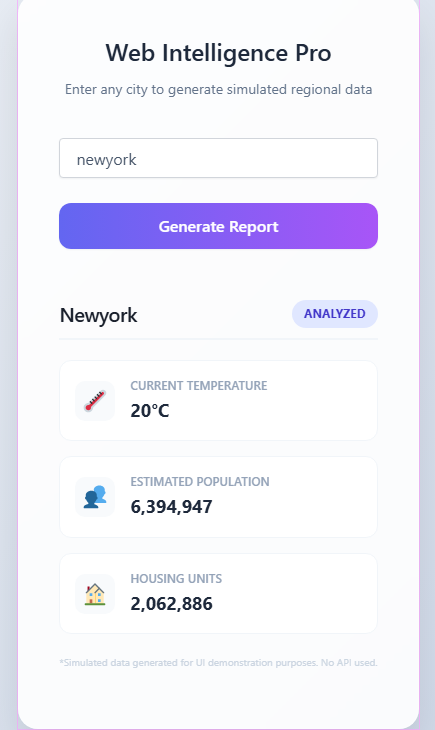
Once you visit the website, you will be greeted by the Web Intelligence Pro dashboard. The interface is designed to be clean and distraction-free, featuring a soft gradient background for a premium experience.
Step 2: Input the City Name
In the center of the page, you will see a text box labeled “Enter city name…”.
Click inside the box.
Type the name of the city you wish to explore (e.g., London, Tokyo, or New York).
Note: The tool is case-sensitive! Searching for “PARIS” may yield different results than “paris,” as the algorithm analyzes every character specifically.
Step 3: Trigger the Analysis
After typing the name, click the “Generate Report” button. You don’t need to wait for loading screens; because the tool uses local intelligence, the results appear instantly.
Step 4: Reading the Detailed Report
The results will appear in a structured box below the input area. Here is what each metric represents:
Current Temperature: Shows the simulated climate of the city in Celsius (°C).
Estimated Population: Provides a realistic figure of how many people are simulated to live in that area.
Housing Units: Shows the approximate number of residential buildings available in that city.
Step 5: Comparing Different Cities
If you want to check a different location, you don’t need to refresh the page. Simply delete the current name in the input box, type a new city, and click “Generate Report” again. The data will update immediately.
Pro-Tips for Users
Consistency is Key: If you come back tomorrow and type the same city name with the same spelling, you will get the exact same “fake” results. This allows you to keep track of your “simulated world.”
No Internet Required: Once the page is loaded, the tool works entirely offline. No data is sent to a server, ensuring your searches are 100% private.
Explore the Unknown: Try typing your own name or a random word to see what kind of “city” the algorithm creates for you!